What is a Crypto Card? Complete 2026 Guide to Types, Fees, and Choosing the Right One
TL;DR
A crypto card is a Visa or Mastercard that lets you spend cryptocurrency at any merchant that accepts those networks — 80 million+ globally. The card converts your crypto to fiat at the moment of purchase, so the merchant gets paid in local currency while you spend from your crypto balance. There are three main types: debit/prepaid (load-then-spend), credit (real credit line, earn crypto rewards), and non-custodial/Web3 (spend directly from your wallet). Choosing the right one depends on your priorities: privacy, cashback, custody, or geographic availability. This guide covers all three types, how they work, fees to watch, and links to our reviews of every major card on the market.
What is a Crypto Card?
A crypto card is a payment card — usually Visa or Mastercard — that lets you spend cryptocurrency for everyday purchases. Functionally, it looks and feels exactly like a traditional debit or credit card: you tap, swipe, or insert at a terminal; you add it to Apple Pay or Google Pay for contactless payments; you can use it online or at ATMs. The difference is what funds the spending. Where a traditional debit card pulls dollars from a bank account, a crypto card pulls from a crypto balance (BTC, ETH, USDT, USDC, or whatever the card supports).
Crypto cards exist because Visa and Mastercard rails are universal — over 80 million merchants worldwide accept them. Direct on-chain crypto payments aren't practically possible at most retail terminals. The crypto card solves this by converting your crypto to fiat at the moment of purchase, so the merchant receives the local currency they expect while you spend from your crypto holdings.
The 3 Types of Crypto Cards
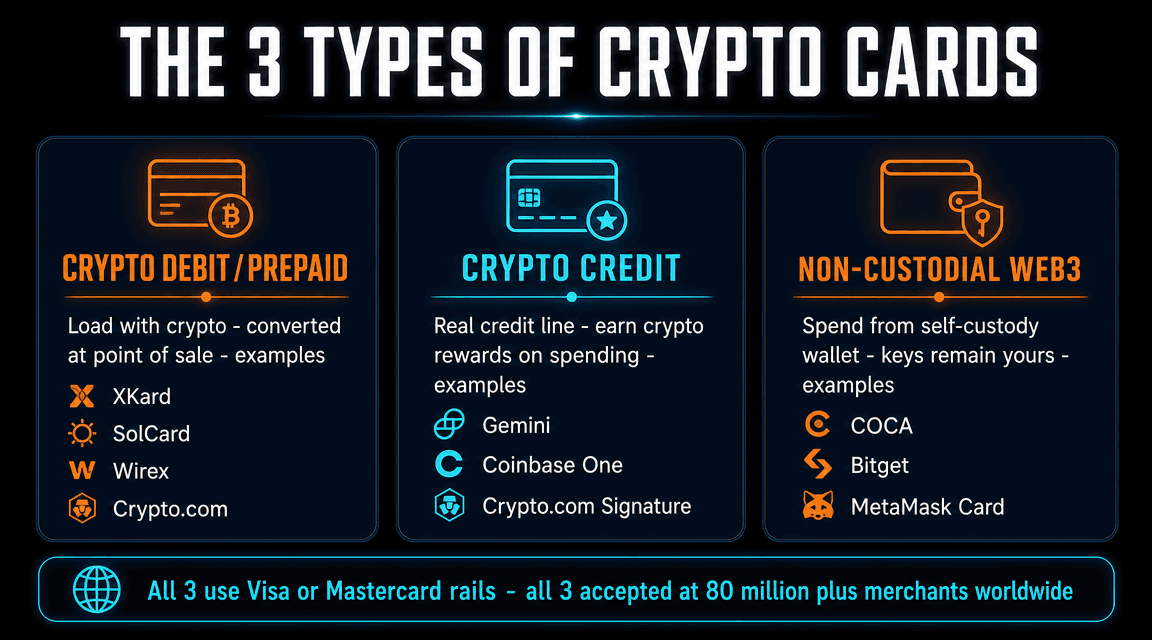
1. Crypto Debit / Prepaid Cards
The most common type. You load crypto onto the card, the issuer holds the balance, and spending draws down that balance. The card is usually "custodial" — the issuer controls your crypto until you spend it. Most no-KYC crypto cards fall into this category.
Examples:
- XKard — zero KYC, virtual + physical, USDT
- SolCard — zero KYC, Solana-native virtual card
- Laso Finance — truly no-KYC, FinCEN-registered, virtual
- Wirex — light KYC, up to 8% cashback
- Crypto.com Visa — full KYC, CRO staking
- KAST — stablecoin Visa with SOL staking
- Goblin Card — physical no-KYC accepting Monero
2. Crypto Credit Cards
Real credit cards issued by a bank (WebBank, JPMorgan, etc.) that earn crypto rewards on spending. Purchases settle in USD against a revolving credit line; you repay monthly from a linked bank account. Rewards are paid in crypto — usually instantly, into a connected exchange wallet. Build credit history like any other credit card.
Examples:
- Gemini Credit Card — up to 4% in 50+ cryptos, no annual fee (US-only)
- Coinbase One Card — 4% flat BTC, requires $49.99 Coinbase One membership (US-only)
- Crypto.com Visa Signature Credit Card — premium credit card with CRO rewards (US-only)
- Nexo Card — dual-mode (debit + credit), up to 2% NEXO rewards (EU)
3. Non-Custodial / Web3 Cards
The newest category. You keep custody of your crypto until the moment of purchase — the card issuer never holds your funds long-term. Uses smart contract wallets, MPC (Multi-Party Computation), or direct wallet-connect spending. Eliminates the "exchange holds my money" risk that affects traditional crypto cards.
Examples:
- COCA Card — Privy MPC wallet, 6% APY, EU/APAC/LATAM
- Bitget Wallet Card — 130+ chain self-custody, $600/mo 0-fee quota
- MetaMask Card — spend from MetaMask Linea wallet directly
- Gnosis Pay — 4337 smart wallet on Gnosis Chain, full self-custody
How a Crypto Card Works (The 5-Step Flow)
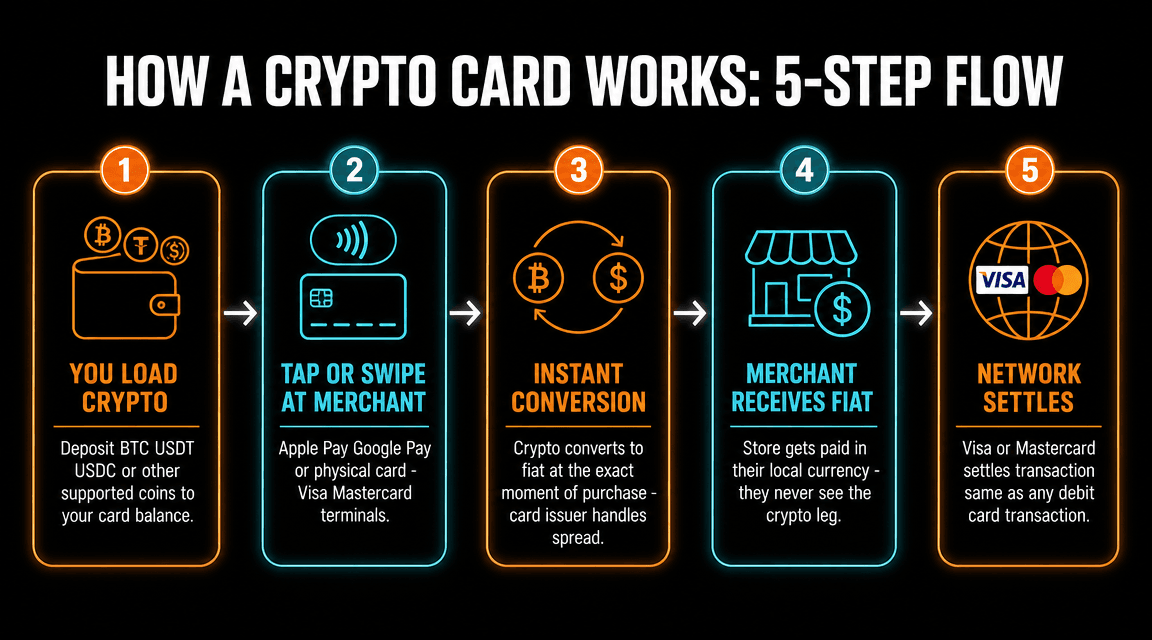
Behind the scenes, every crypto card purchase involves these steps — usually completed in under 2 seconds:
- You load crypto. Deposit BTC, USDT, USDC, ETH, or other supported coins to your card balance. For non-custodial cards, this step is replaced by "you authorize the card to access your wallet."
- You tap, swipe, or pay online. Use the physical card, the Apple Pay/Google Pay-loaded virtual card, or the card number for online checkout. At the terminal, the merchant initiates a normal Visa/Mastercard transaction.
- Instant crypto-to-fiat conversion. The card issuer converts your crypto to the merchant's local currency at the current exchange rate. This happens in milliseconds. The issuer takes a small spread (usually 0.5-2%) on the conversion.
- Merchant receives fiat. The merchant's bank receives dollars (or euros, pounds, etc.) the same way they would for any other Visa/Mastercard purchase. The merchant never knows crypto was involved.
- Visa/Mastercard settles. The card network handles inter-bank settlement on standard timelines (1-3 business days). Your card statement shows the fiat amount; some issuers also show the crypto amount that was deducted.
Crypto Cards vs Traditional Debit Cards
| Feature | Crypto Card | Traditional Debit Card |
|---|---|---|
| Funding source | Crypto balance | Bank account |
| Bank account required | Usually no | Yes |
| KYC | Varies (none to full) | Full required |
| FX fees abroad | Often 0% (top cards) | 2-3% typical |
| Cashback rewards | Up to 8% in crypto | 0-2% typically |
| Privacy options | No-KYC options exist | Always linked to identity |
| Universal acceptance | 80M+ merchants (Visa/MC) | 80M+ merchants (Visa/MC) |
Crypto Card Fees to Watch
All-in fees vary widely. Here's the typical fee structure:
- Annual fee. $0 to $588/year. Most cards have $0; XKard tiers up to $588 for Whale; Crypto.com tiers up to $4,000/year for Obsidian. Always check before signing up.
- Card issuance/shipping. $0 to $40 (KAST shipping fee). Virtual cards are usually free.
- Top-up / reload fee. 0% to 5%. Wirex, Bitget, COCA, KAST = 0%. SolCard = 5%. XKard = 2.3-4.5% depending on tier.
- Conversion spread. 0.5% to 2% on crypto-to-fiat. Embedded in the rate shown.
- Foreign exchange (FX) fee. 0% to 3%. Top no-KYC cards (XKard, Bitget, COCA) typically 0%. Some legacy cards charge 2-3%.
- ATM withdrawal fee. $0 to $3.50 per withdrawal. Often plus a percentage (0.5-2%). ATM operator may charge separately.
- Inactivity fee. Some cards charge $5-10/month after 3-12 months of no activity. Read terms carefully.
- Cash advance fee (credit cards only). $10 or 3% (whichever greater) + immediate interest at 17.99-29.99% APR. Avoid using crypto credit cards for ATM cash.
How to Choose the Right Crypto Card
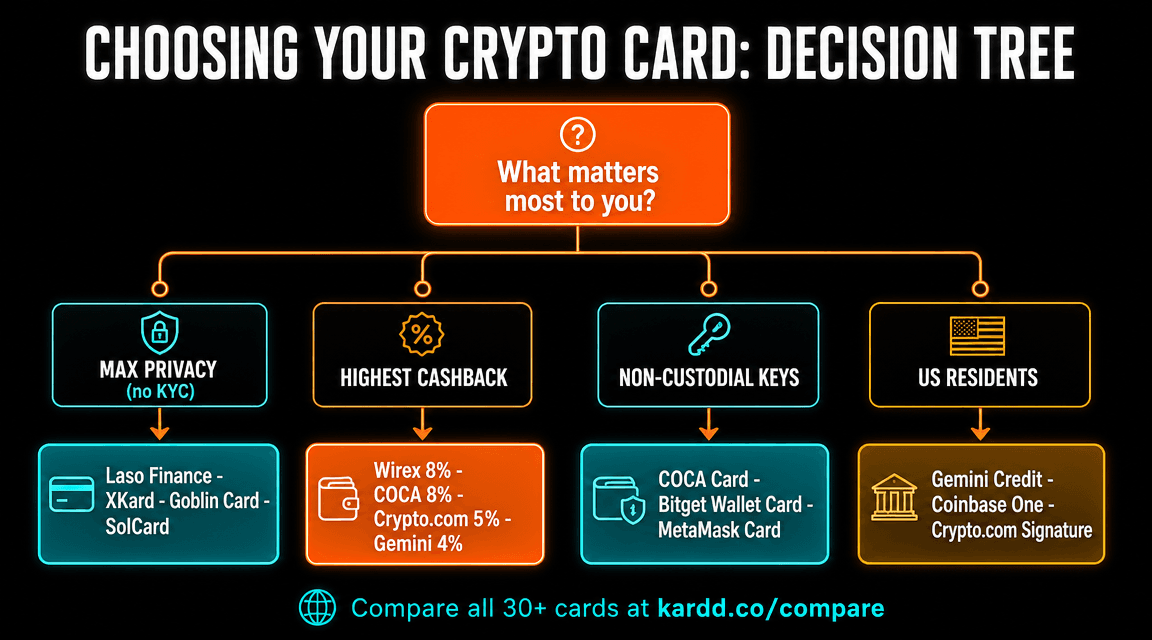
Start by ranking your priorities. Then map to the cards that excel at each:
If maximum privacy is your priority
Look at no-KYC cards. Laso Finance is truly no-KYC (no email, no ID, FinCEN-registered). XKard is zero KYC with virtual + physical options. Goblin Card is the only physical no-KYC card that accepts Monero. SolCard is virtual-only on Solana. See our anonymous crypto card guide.
If maximum cashback is your priority
Wirex pays up to 8% Cryptoback (with WXT staking). COCA Card pays up to 8% in USDT (Elite tier with $COCA staking). Crypto.com pays up to 5% in CRO (top staking tier). Compare all cashback cards.
If you want non-custodial / self-custody
COCA Card uses Privy MPC smart wallets (you hold the keys). Bitget Wallet Card works from a 130+ chain self-custody wallet. MetaMask Card spends directly from MetaMask. See the Web3 cards guide.
If you live in the US
Most no-KYC cards explicitly exclude US residents. Your best bets: Gemini Credit Card (4% crypto back), Coinbase One Card (4% flat BTC), Crypto.com Visa, Wirex. See our US crypto card guide.
If you need ATM cash withdrawals
You need a physical card. Top picks: KAST (Mastercard with ATM), Goblin Card ($500/day no-KYC ATM), Wirex, Crypto.com Visa, XKard physical.
Are Crypto Cards Safe?
Yes, for most legitimate issuers — with caveats.
- Visa zero-liability protection applies to crypto cards just like traditional debit cards. If your card is used fraudulently, you're not liable for the fraudulent charges (subject to reporting within typical windows).
- Custodial risk varies. Custodial cards hold your crypto until you spend it. If the issuer is hacked, freezes, or goes insolvent (FTX, Celsius), you could lose your balance. Non-custodial cards eliminate this risk.
- Regulatory risk. Card issuers can be sanctioned or shut down. We've seen this happen (FairFX, Bitstamp Card, several others). Spread risk across multiple cards if you carry large balances.
- Phishing and social engineering are the largest practical risks. Never share your seed phrase. Always check URLs. Use 2FA everywhere.
See our deep-dive on crypto card safety and our guide on frozen funds risks.
Tax Implications
In the US, UK, EU, Australia, Canada, and most major jurisdictions: spending crypto is a taxable event. When your crypto debit card converts BTC/ETH/USDT to dollars at the merchant terminal, you're effectively "selling" that crypto. The difference between your cost basis (what you paid for it) and the value at the moment of spending is a capital gain or loss.
Two exceptions:
- Stablecoin spending typically generates minimal taxable events because USDT/USDC/DAI track $1. Buy at $1.00, spend at $1.00 = ~$0 gain. (Small fluctuations and exchange rate spreads create tiny gains/losses.)
- Crypto credit card rewards received from spending are not taxable at receipt (treated like cashback). They become taxable only when you sell, swap, or spend those rewards later.
Keep records: date, USD value at the time of each crypto card transaction, cost basis of the crypto used. Most exchanges and tax software (CoinLedger, Koinly, CoinTracker) handle this automatically if you link your accounts.
Getting Started: 5-Step Checklist
- Decide your priorities. Privacy, cashback, custody, ATM access, US-availability. Use the decision tree above.
- Pick 1-2 candidates from our reviews. Read the detailed review for each shortlisted card.
- Check geographic availability. Most cards have country restrictions. Confirm before signing up.
- Sign up with the smallest amount you can. Test before committing significant funds. Verify the card actually works for your use cases.
- Set up Apple Pay / Google Pay. Adds the card to your phone wallet for tap-to-pay. Most cards support this; virtual-only cards rely on it.
Ready to pick a crypto card?
Compare 30+ crypto cards side-by-side on Kardd. Filter by KYC level, fees, supported crypto, geographic availability, and more.
Compare All Crypto Cards →FAQ
What is a crypto card?
A crypto card is a payment card (debit, credit, or prepaid) that lets you spend cryptocurrency for everyday purchases. Most crypto cards work by converting your crypto into fiat currency at the moment of purchase using Visa or Mastercard rails — so the merchant gets paid in their local currency while you spend from your crypto balance. They accept BTC, ETH, USDT, USDC, and many other coins depending on the issuer.
How does a crypto card work?
When you tap or swipe a crypto card at a merchant terminal, three things happen instantly: (1) the card issuer converts your crypto to fiat at the current market rate, (2) Visa or Mastercard processes the transaction normally, (3) the merchant receives the local currency. You see the fiat amount on the receipt; the merchant never knows crypto was involved. Most cards use real-time conversion; some prepaid models convert at top-up time.
What are the different types of crypto cards?
Three main types: (1) Crypto debit/prepaid cards — you load crypto, spend converted fiat. Examples: XKard, SolCard, Wirex, Crypto.com Visa. (2) Crypto credit cards — real credit line, earn crypto rewards on spending. Examples: Gemini Credit Card, Coinbase One Card. (3) Non-custodial/Web3 cards — spend directly from your self-custody wallet, keys stay yours. Examples: COCA, Bitget Wallet Card, MetaMask Card.
Are crypto cards safe to use?
Most legitimate crypto cards (issued by regulated entities like Wirex, Coinbase, WebBank-for-Gemini) are as safe as traditional debit cards from a fraud/security standpoint. Visa zero-liability protection applies. However, custodial cards introduce counterparty risk — your crypto is held by the issuer until spending. Non-custodial cards eliminate this risk. Always verify the issuer is regulated and read recent user reviews before depositing significant amounts.
Do crypto cards require KYC?
Most do — particularly cards issued by regulated banks (Gemini via WebBank, Coinbase, Crypto.com). However, several truly no-KYC options exist: XKard, SolCard, Laso Finance (FinCEN-registered MSB), Goblin Card. These cards verify nothing — no email, no ID, no proof of address. They work by using on-chain monitoring instead of identity collection.
Can I use a crypto card at ATMs?
Most physical crypto cards support ATM withdrawals (Crypto.com, Wirex, KAST, Goblin, XKard physical, Gemini physical). Virtual-only cards (Laso, SolCard) typically don't. ATM fees vary: most issuers charge 2-3% plus a flat fee. The ATM operator may charge additional fees on top.
What's the difference between a crypto debit card and a crypto credit card?
Crypto debit cards (e.g., Crypto.com, Wirex) spend from your loaded balance — like a prepaid card. You convert crypto to fiat to fund spending; no credit line, no monthly bill. Crypto credit cards (e.g., Gemini Credit Card, Coinbase One Card) work like traditional credit cards — purchases settle in USD on a revolving line; rewards are paid in crypto on every purchase. Credit cards build credit history; debit cards do not.
Can I get a crypto card without a bank account?
Yes. Most crypto debit/prepaid cards don't require a bank account — you fund them directly with crypto. This is one of the major appeals for the unbanked or for users who want to maintain financial privacy. Laso, XKard, SolCard, and Goblin Card all work without bank accounts.