Crypto Cards With Google Pay 2026: 8 Cards That Tokenize Cleanly
Quick answer: Crypto cards that work cleanly with Google Pay in 2026 include Crypto.com Card, MetaMask Card (EEA/UK), COCA Card, Wirex, Bleap, XKard, and Kolo Card. Adding a card takes ~2 minutes: open Google Wallet, tap +, enter card details, verify by SMS/email/push, done. Google Pay generates a Device Account Number so merchants never see your real PAN. Tokenized taps inherit the card's underlying fee and cashback structure — Google does not add markup. Availability varies by region and bank-of-issue; verify in the Google Wallet app before assuming your card will work.
Tap-to-pay from an Android phone is the cleanest way to spend crypto. The card sits in Google Wallet as a tokenized credential, your real card number stays hidden from merchants, and your phone unlocks the payment with biometrics. For privacy-conscious crypto spenders, the Google Pay rail is materially safer than handing over a physical card — merchants only see a Device Account Number that can be revoked without re-issuing the card.
But not every crypto card adds cleanly to Google Wallet. Some issuers haven't enabled tokenization in your region. Some virtual prepaid programs are blocklisted. And the "Google Pay supported" bullet on a marketing page often glosses over which countries actually work. This guide covers the 8 crypto cards that reliably work with Google Pay in 2026, the step-by-step add-to-wallet process, and the security model that makes mobile-wallet taps the safer default.
6 Things to Know About Google Pay and Crypto Cards
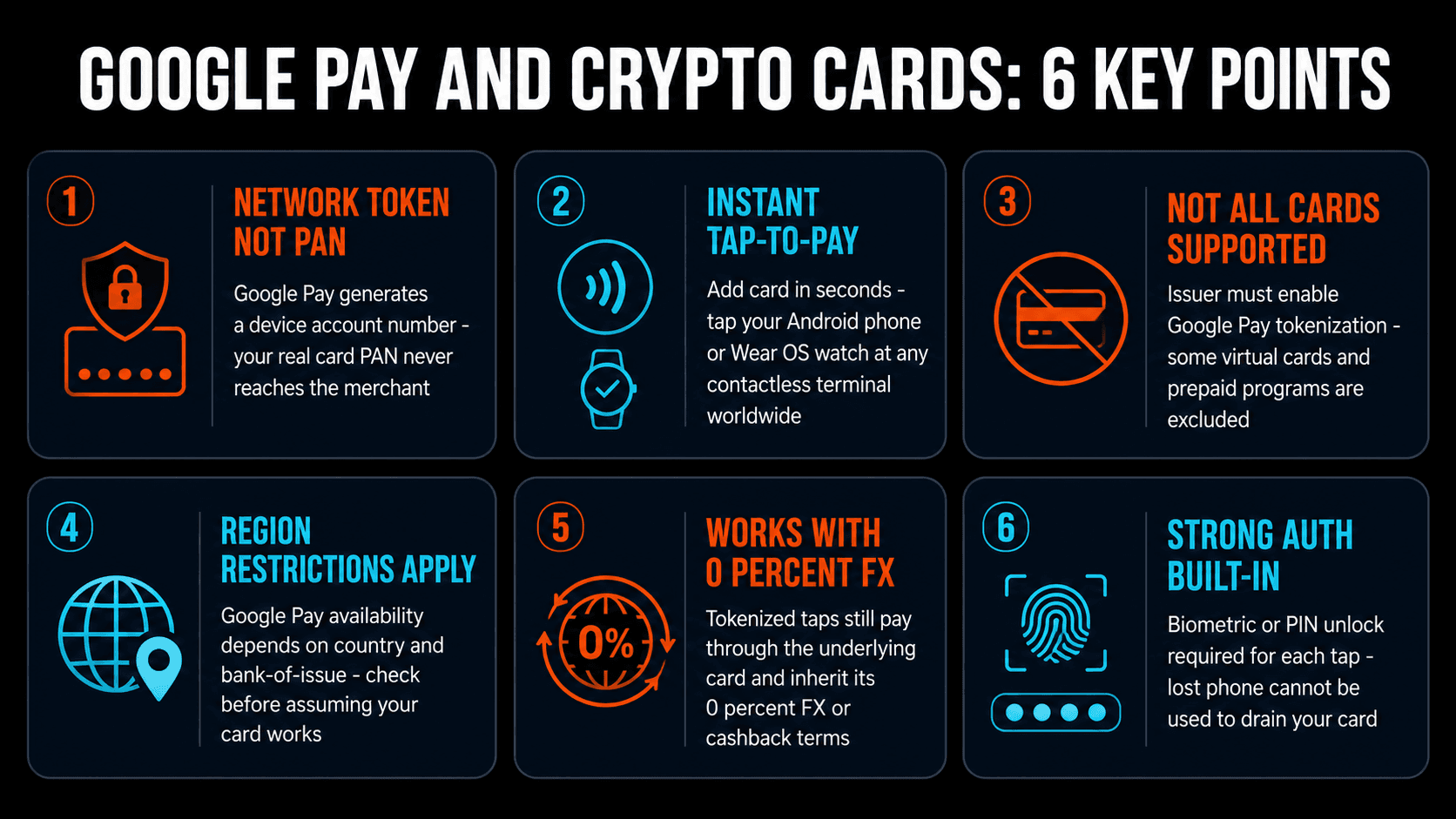
- Google Pay uses a Device Account Number (DAN), not your PAN. When you add a card, Google Pay generates a one-per-device token. The merchant terminal receives the DAN, not your real card number. If your phone is lost, the DAN can be revoked instantly without re-issuing the underlying card.
- Setup takes ~2 minutes per card. Open Google Wallet, tap +, enter card details (or scan), verify via SMS/email/in-app push, done. The card sits next to your bank cards in the wallet.
- Not every crypto card is supported. The issuer must enable Google Pay tokenization on the bank-of-issue side. Some virtual-only prepaid programs are excluded. Some BIN ranges are on Google's blocklist. Check Google Wallet's "supported issuers" help page or just try adding the card — you'll know within a minute.
- Region restrictions apply. Google Pay availability depends on the country your phone is registered in AND the country of the card issuer. Some cards work with Google Pay in EEA but not US, or vice versa.
- Tokenized taps inherit underlying card terms. Google Pay does not add fees or change cashback rates. A 0% FX card stays 0% FX. A 5% cashback card stays 5% cashback. Apple/Google are paid by the card networks via interchange, not by you.
- Strong authentication is built in. Every tap requires biometric unlock (fingerprint, face) or PIN. Lost phone with no biometric setup is the only realistic risk — and the DAN is revocable remotely.
8 Crypto Cards That Work With Google Pay in 2026
1. XKard — Best No-KYC + Google Pay
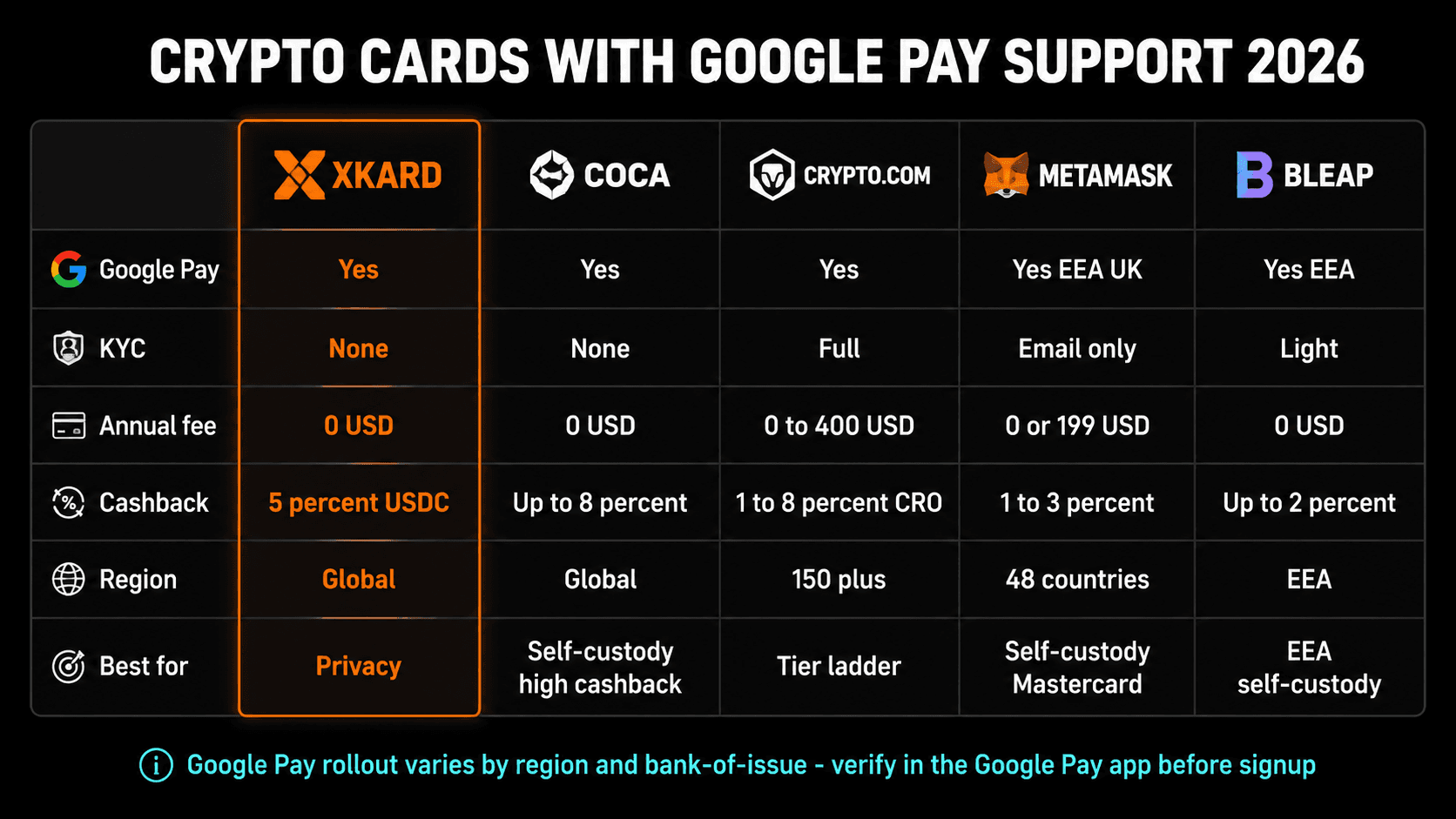
XKard uses email-based signup (no government ID) and supports Google Pay tokenization on Android. 5% USDC cashback paid monthly. Multi-chain top-up (USDT/USDC across Tron, Solana, Polygon, BSC). The combination of light KYC and Google Pay support is rare — most no-KYC cards struggle to get Google Wallet tokenization because Google's issuer requirements are stricter than the underlying card network's. Sign up via Kardd for our standard referral.
2. Crypto.com Card — Most Mature Google Pay Integration
Crypto.com Card has supported Google Pay since 2020 and across all tiers (Midnight Blue free, Ruby $60/yr, Royal Indigo $360/yr, Obsidian $4K stake). The integration is the most mature in the crypto card industry — instant card delivery, virtual card available before physical arrival, full Google Wallet feature parity. Cashback ranges 0–5% depending on tier. Available in 150+ countries.
3. MetaMask Card — Self-Custody + Google Pay (EEA/UK)
MetaMask Card supports Google Pay in the EEA and UK. Self-custody (MPC wallet) with Mastercard rails. Virtual tier free with 1% mUSD cashback; Metal tier $199/yr with 3% on first $10K then 1%. The Google Pay integration is the only mainstream self-custody option that also works with Android tap-to-pay outside Apple Wallet.
4. COCA Card — Light KYC + Google Pay
COCA offers self-custody (MPC) with up to 8% cashback on direct stablecoin pairs and supports Google Pay tokenization on Android. 0% FX on direct pairs (USDC→USD, EURC→EUR) but 1% on indirect currency pairs. Available globally. Sign up via /go/coca-card.
5. Wirex — Multi-Currency + Google Pay
Wirex supports Google Pay across all tiers. Standard (free, 0.5% cashback), Premium ($16.99/month, 1.5% cashback), Elite ($31/month, up to 8% cashback). Multi-currency accounts (USD/EUR/GBP/CAD) make Wirex an excellent travel companion. The cashback is paid in WXT, a Wirex platform token with its own price volatility.
6. Bleap — EEA Self-Custody + Google Pay
Bleap (bleap.finance) is an EEA self-custody card that supports Google Pay tokenization. Up to 2% cashback (capped). 0% FX. Free card. The Spanish-issued Bleap is one of the few self-custody options with native EEA banking rails — the card pulls from on-chain USDC and settles in EUR at point of sale.
7. Kolo Card — BTC Cashback + Google Pay
Kolo positions itself as a Bitcoin-cashback card with Google Pay and Apple Pay tokenization across 170+ countries. 2% BTC cashback (rate has shifted historically — verify current). Visa Platinum acceptance. Not available in the US. Free annual fee, free monthly fee, 0% FX on stablecoin-funded transactions.
8. Crypto.com Card Solana Edition — Newest Google Pay Crypto Card
Launched February 2026 as a virtual prepaid Solana ecosystem card. Apple Pay and Google Pay support from day one. SOL and other Solana SPL tokens supported. Free tier. The newest crypto card on the market to ship with Google Pay tokenization out of the gate.
How to Add a Crypto Card to Google Pay (5 Steps)
The process is the same for every supported crypto card:
- Open Google Wallet on your Android phone. If you don't have it, install from the Play Store (free).
- Tap the + icon and select "Payment card." Choose "Credit, debit, or prepaid card."
- Enter card details. Manually type the card number, expiry, and CVC, OR tap "Scan card" to capture details with your camera. Both methods work; scanning is faster but only on physical cards.
- Verify with your issuer. The card issuer (Crypto.com, MetaMask, Wirex, etc.) sends a verification code via SMS, email, or in-app push notification. Enter it in Google Wallet to confirm card ownership. This step usually takes under 60 seconds.
- Confirm tokenization. Google Wallet creates a Device Account Number tied to your physical phone. Look for the green checkmark and the message "Card ready to use." Now make a test purchase — tap your phone at any contactless terminal. Confirm the transaction appears in your card app.
If verification fails, the most common reason is that your card's region or BIN range isn't supported by Google Pay in your country. Check the issuer's help docs first; if the issuer says it should work, contact Google Pay support with the specific error code.
Google Pay vs Apple Pay: Which Is Better for Crypto Cards?
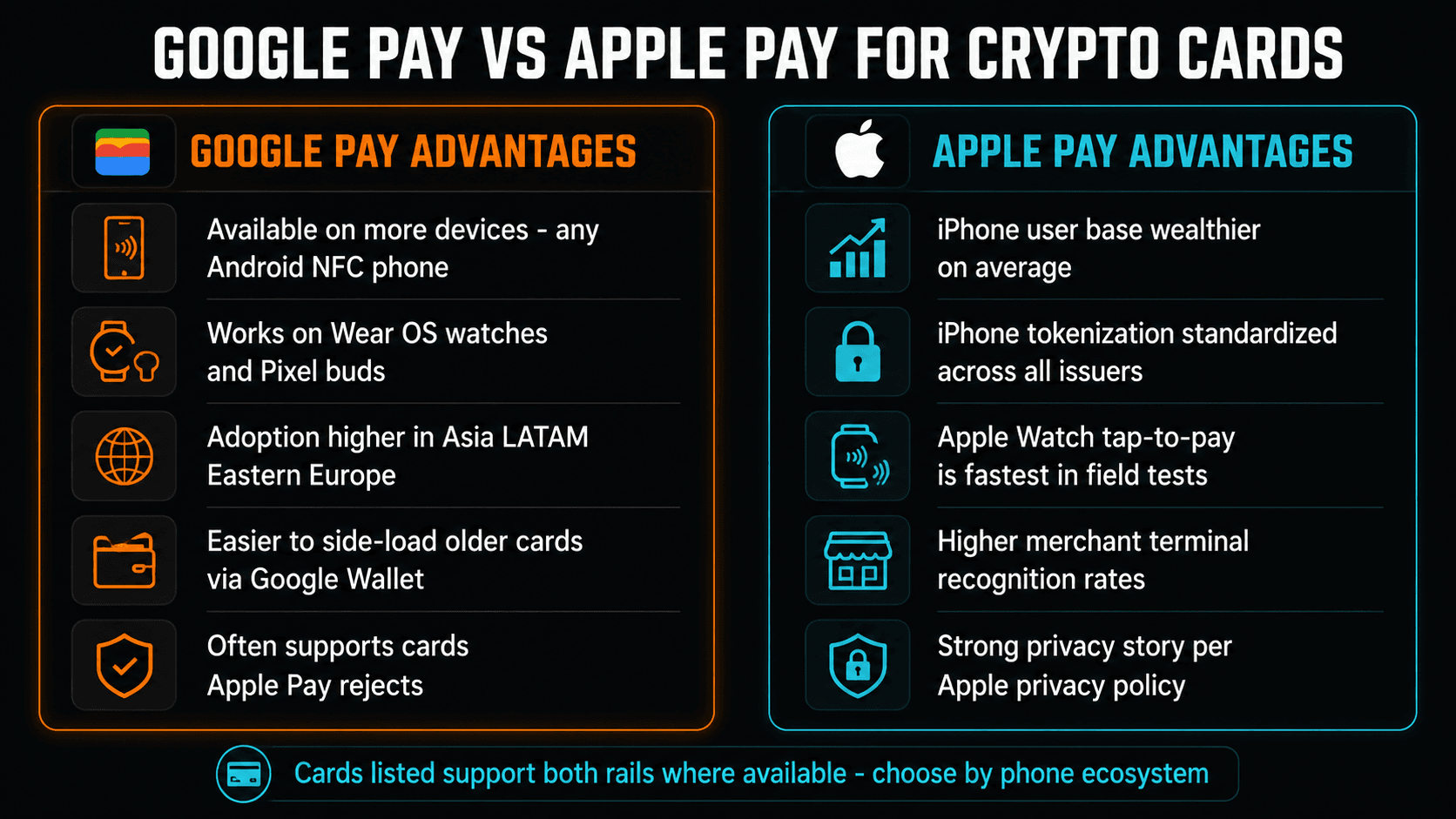
Both wallets use the same EMV tokenization standard, so security is roughly equivalent. The practical differences:
Google Pay wins on…
- Device variety — any Android NFC phone works, plus Wear OS watches
- Regional coverage — available in more countries than Apple Pay, especially in Asia, LATAM, and Eastern Europe
- Issuer coverage — often supports cards that Apple Pay rejects (smaller prepaid programs, niche issuers)
- Side-loading — older cards can be added more easily via the Google Wallet API
Apple Pay wins on…
- Tap speed — Apple Watch tap-to-pay is consistently fastest in field tests
- Terminal recognition — higher first-tap success rate at older terminals
- Tokenization standardization — iOS Wallet API is simpler, fewer integration edge cases
- Privacy story — Apple's privacy policy is stricter and more auditable than Google's
Practical advice: use whichever wallet matches your phone ecosystem. If you have both an Android and an iPhone, add the same crypto card to both wallets — the DAN is per-device, so each wallet gets its own token. Both can revoke independently if a phone is lost.
When Google Pay Tokenization Will Fail (and How to Fix It)
Most adding-to-wallet errors fall into one of these categories:
- "Card not supported by Google Pay in this region." The issuer hasn't enabled your country. Fix: check the issuer's help docs for a current support matrix; otherwise wait for rollout.
- "Verification code expired." SMS or email code arrived late. Fix: re-trigger verification, enter the new code within 2 minutes.
- "Unable to verify card." Usually means the issuer's tokenization endpoint is down or the BIN is on Google's blocklist. Fix: try again in a few hours; if persistent, contact the issuer.
- "You can only add this card to one device." Some prepaid programs limit to one device per card. Fix: remove from the other device first, or request a second virtual card from the issuer.
- "Card requires additional verification." Issuer wants extra KYC. Common on light-KYC cards that didn't complete the higher-tier identity check. Fix: complete the additional KYC in the card app.
Privacy Considerations
Adding a crypto card to Google Pay means Google has a record of your card existing in the wallet (number, issuer, last 4 digits). Google does not see individual transaction amounts (those go bank-to-bank via the card network), but it does see:
- Which cards you have in your wallet
- The timestamp and merchant of every tokenized tap
- Your phone's general location at the time of payment (if you have location services enabled)
If you're using a crypto card specifically to escape bank surveillance, putting it in Google Wallet partially undoes that — you're trading your bank's data tap for Google's data tap. The card transactions themselves remain settled via the card's usual chain (Solana, Linea, Tron, etc.), but the merchant + timestamp + general location is now in Google's records. For most users this is an acceptable trade for the convenience and the PAN-hiding benefit. For users prioritizing privacy above all else, a physical card with a fresh PIN and no mobile wallet is still the cleanest path.
Our Picks at a Glance
Best Google Pay crypto card if you want…
- Light KYC + 5% cashback: XKard
- Self-custody (EEA/UK): MetaMask Card
- Self-custody global + high cashback: COCA Card
- Mature platform + tier ladder: Crypto.com
- BTC cashback: Kolo Card
Cards that do NOT support Google Pay (or have limited support):
- KAST Card — physical card only, no Google Pay tokenization as of May 2026
- Bancus — limited mobile wallet support
- Tokyniq — new platform, no mobile wallet yet
- Some virtual-only prepaid programs — Google's issuer requirements exclude them
- Cards in unsupported countries — check Google Wallet's country list before assuming
Final Take
For Android users, Google Pay is the cleanest way to spend crypto. The tokenization model hides your real card number from merchants, the biometric unlock blocks lost-phone fraud, and the underlying card's 0% FX or cashback all flow through unchanged. The only friction is the patchwork of supported issuers and regions — but as of 2026, every major crypto card except KAST and a few niche prepaid programs supports Google Wallet tokenization in their primary markets.
If you're picking a single crypto card today and Google Pay matters: XKard for privacy + 5% USDC cashback, Crypto.com for the most mature integration and tier ladder, or MetaMask Card for self-custody in the EEA/UK. All three support Google Pay out of the box. Add the card, verify, tap once at a coffee shop to confirm, and your crypto is now spendable from your phone.