- A physical card carries two PINs, and your app reaches one. Modulr: the offline PIN is “stored on the card chip”, the online PIN “is not stored on the card”, and after an app change the chip “will remain unchanged” until it next goes online.
- Three wrong tries blocks a PIN everywhere we looked, and the two block separately. Modulr: “there is no way for you to know whether the Offline PIN is currently blocked”.
- A blocked online PIN can kill the whole card. On Stripe the status goes to
inactive: no transactions “PIN-verified or otherwise”. A blocked offline PIN leaves online shopping working. - One brand runs four PIN regimes. Crypto.com offers an in-app reset in four markets, bars ATM changes in three, and offers no app change at all in the EU and UK.
- Of nine no-KYC sites, one mentions a PIN. XKard’s “Change your PIN anytime” comes with no mechanism; KAST and SolCard advertise ATM withdrawals without using the word once.
On this page
- Your card stores two PINs, and the app only reaches one
- What nine card programmes actually let you do
- Why the PIN you just changed gets declined
- Three wrong tries, and the two PINs block differently
- One card brand, four PIN regimes
- Where in the world the chip decides
- A virtual card has no PIN, so it has no ATM
- The no-KYC gap: nine sites, one PIN promise
- What to do when your PIN stops working
- Final take
- Sources
- Related articles
- FAQ
You changed it in the app, the app said it was done, and the reader in the shop still says wrong PIN. Nothing about your balance explains it, because your crypto card PIN is stored in two places and the app only reaches one. The stakes are bigger than one failed purchase: three consecutive wrong entries blocks a PIN on every platform that publishes a number, and on one of them it deactivates the whole card. So we spent 14 November 2026 reading four issuing platforms' PIN rulebooks, five of Crypto.com's regional help articles, its US cardholder agreement, and the record of nine no-KYC programmes.
Three things are worth separating first. The online PIN lives with the issuer; the offline PIN lives on your card's chip; the programme decides whether you may see or change either. Most troubleshooting advice addresses the third and never mentions the first two.
Your card stores two PINs, and the app only reaches one
Modulr, which issues cards for other companies, documents the split more plainly than anyone. The offline PIN is “stored on the card chip and can be read without the card reader going online”. The online PIN “is not stored on the card” — it is checked against the issuer's host, and every ATM goes online to do it. When the card is manufactured the two agree: at creation “both Online and Offline PIN match”.
Stripe describes the same chip from the other side. One function of the EMV chip is to store the PIN, which “allows card terminals to verify an entered PIN against the card itself, without needing to verify it online”. That is the point of an offline PIN: a terminal on a train, at a fuel pump or in a shop with a bad line can still check you without asking anyone.
Online PIN — held by the issuer, never on the card, checked over the network. Every ATM uses it. Changing it is a database write.
Offline PIN — held on your card's chip, checked by the terminal with no network. Changing it needs the physical card at a terminal that goes online. Modulr: “It is not possible to retrieve the Offline PIN value via APIs.”
Hold on to that last quotation. The programme running your card cannot read the number on your chip, and neither can you. Everything awkward below follows from it.
What nine card programmes actually let you do
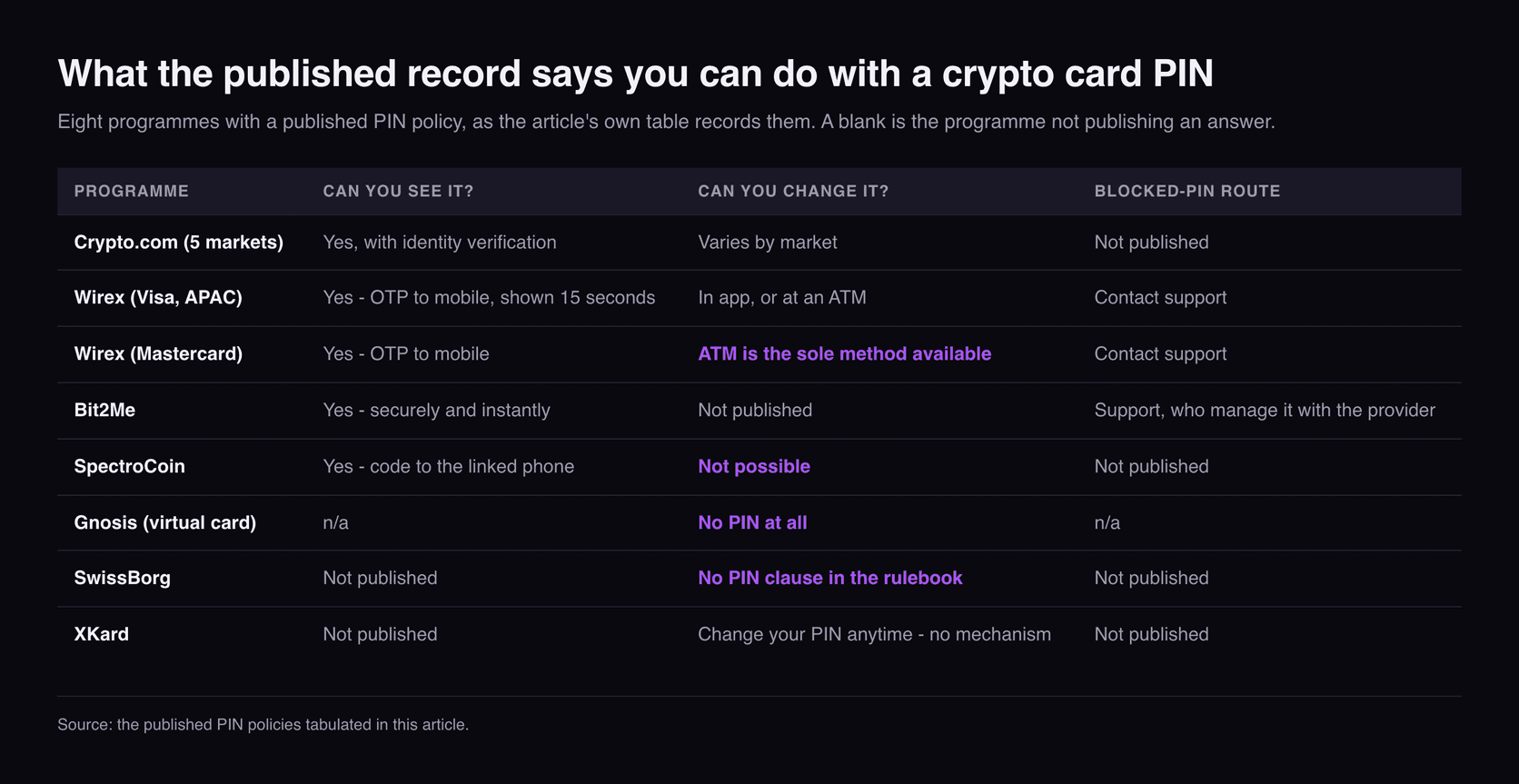
A PIN policy is a product decision rather than a technical one, and the programmes with a published record disagree about all of it. The blanks below are as informative as the entries.
| Programme | Initial PIN | Can you see it? | Can you change it? | Blocked-PIN route |
|---|---|---|---|---|
| Crypto.com (5 markets) | “randomly generated” | Yes, with identity verification | Varies by market — see the table below | Not published |
| Wirex (Visa, APAC) | Not published | Yes — OTP to mobile, shown 15 seconds | In app, or at an ATM | Contact support |
| Wirex (Mastercard) | Not published | Yes — OTP to mobile | ATM is “the sole method available” | Contact support |
| Bit2Me | Not published | Yes — “securely and instantly” | Not published | Support, who “manag[e] it with the provider” |
| SpectroCoin | Not published | Yes — code to the linked phone | “not possible” | Not published |
| Gnosis (virtual card) | No PIN at all | n/a | n/a | n/a |
| SwissBorg | No PIN clause in the rulebook | Not published | Not published | Not published |
| XKard | Not published | Not published | “Change your PIN anytime” — no mechanism | Not published |
Two rows deserve pulling out. SpectroCoin does not offer it at all: “Currently, the possibility to change a PIN code of a card is not possible for SpectroCoin cards.” You get the number the card was made with, you can look it up after a code to your linked phone, and that is the whole feature.
And SwissBorg's Card Rulebook never mentions a PIN. It is a detailed document — overdrafts, a minimum balance at fuel pumps, a 3D Secure flow, a card freeze — with no clause on how the PIN is issued, blocked or replaced. A cardholder reading their own contract would not learn their card has one.
Why the PIN you just changed gets declined
When a PIN is changed through an app or API, Modulr says the change lands on the online PIN only, and “the PIN on the chip (Offline PIN) will remain unchanged” until the card is next used at a terminal that goes online. At that moment the chip quietly updates, “as part of the Chip and PIN transaction”.
Until then you carry a card with two different PINs on it, and which one you need depends on the terminal in front of you. Modulr's options: use the old PIN, find a merchant that verifies online, or visit an ATM to load the new one.
Stripe states the rule more bluntly. After an API change, used in an offline-PIN region, the cardholder “must first make a successful transaction using their previous PIN” — the terminal only writes the new PIN onto the chip once it has verified the old one. The way to finish changing your PIN is to use the PIN you just replaced.
Both agree on the clean fix, because ATMs always go online. Modulr: a PIN changed at an ATM, or by API then used at one, “is guaranteed to update both Online and Offline PIN values at the same time”. Stripe calls ATMs “the recommended way to change PINs”.
Crypto.com's Canadian article carries a trace of the requirement without explaining it: after an app reset you are told to activate the PIN with a transaction requiring it — which only makes sense if something other than the app holds a copy. Our guide to why crypto cards get declined covers the other causes; this is the one your app will swear is fixed.
Three wrong tries, and the two PINs block differently
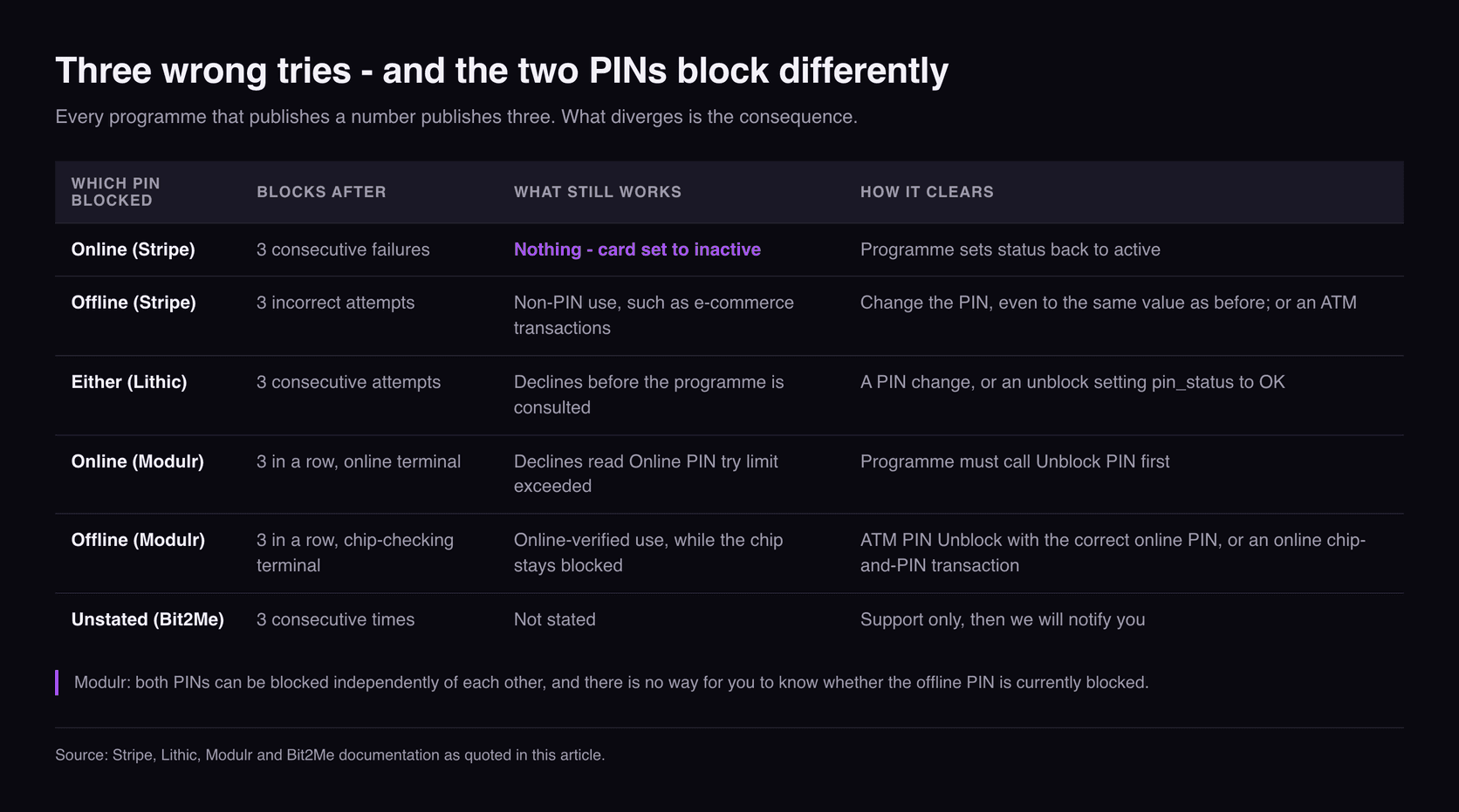
Everyone who publishes a number publishes the same number. Stripe: “If you incorrectly enter a card's PIN three consecutive times, the PIN becomes blocked.” Lithic records it as pin_status: BLOCKED, reason EXCESSIVE_PIN_ATTEMPTS. Bit2Me, for cardholders: enter it wrong “3 consecutive times, it will be automatically blocked”. What nobody tells cardholders is that the consequences diverge depending on which of the two you exhausted.
| Which PIN blocked | Blocks after | What still works | How it clears |
|---|---|---|---|
| Online (Stripe) | 3 consecutive failures | Nothing — card set to inactive | Programme sets status back to active |
| Offline (Stripe) | 3 incorrect attempts | Non-PIN use, “such as e-commerce transactions” | Change the PIN, “even to the same value as before”; or an ATM |
| Either (Lithic) | 3 consecutive attempts | Declines before the programme is consulted | A PIN change, or an unblock setting pin_status to OK |
| Online (Modulr) | 3 in a row, online terminal | Declines read “Online PIN try limit exceeded” | Programme must call Unblock PIN first |
| Offline (Modulr) | 3 in a row, chip-checking terminal | Online-verified use, while the chip stays blocked | ATM “PIN Unblock” with the correct online PIN, or an online chip-and-PIN transaction |
| Unstated (Bit2Me) | 3 consecutive times | Not stated | Support only, then “we will notify you” |
The top row should change how carefully you type. A blocked online PIN on Stripe does not merely stop PIN purchases: the status goes to inactive and the cardholder “can't make any further transactions, PIN-verified or otherwise”. Three fumbled digits at a cash machine, and the subscription on that card fails too.
A blocked offline PIN is gentler and stranger. The card keeps working online, so nothing tells you anything is wrong, and Modulr supplies the most awkward sentence in the research: “there is no way for you to know whether the Offline PIN is currently blocked” — and “Both PINs can be blocked independently of each other”.
Two mercies are documented. Lithic: “Changing the PIN will always unblock a blocked offline PIN”. Stripe agrees it works “even to the same value as before”, while warning that the next offline transaction “might still fail once”.
One card brand, four PIN regimes
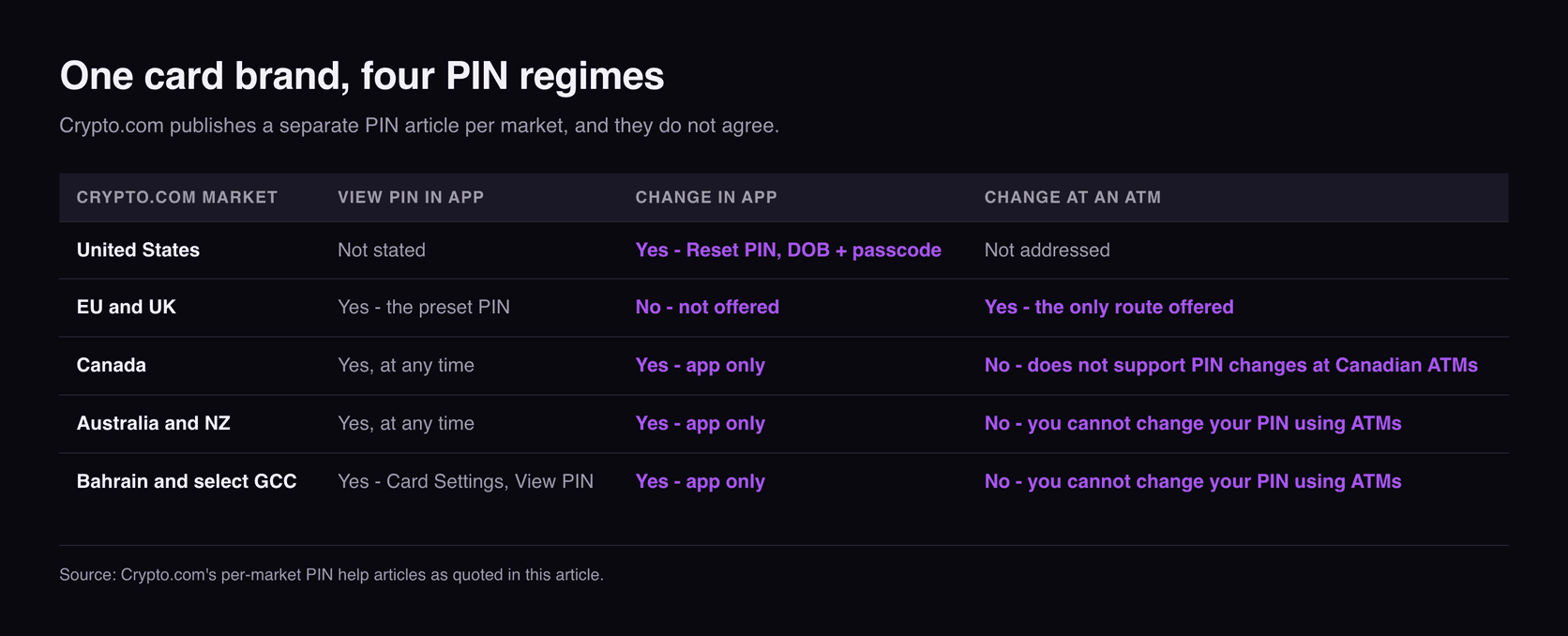
If PIN rules came from the network or the chip, one brand would behave the same way everywhere. Crypto.com publishes a separate PIN article per market, and they do not agree.
| Crypto.com market | View PIN in app | Change in app | Change at an ATM |
|---|---|---|---|
| United States | Not stated | Yes — Reset PIN, DOB + passcode | Not addressed |
| EU and UK | Yes — the “preset PIN” | No — not offered | Yes — the only route offered |
| Canada | Yes, “at any time” | Yes — “can only be changed via the Crypto.com App” | No — “does not support PIN changes at Canadian ATMs” |
| Australia and NZ | Yes, “at any time” | Yes — app only | No — “You cannot change your PIN … using ATMs” |
| Bahrain and select GCC | Yes — Card Settings, View PIN | Yes — app only | No — “You cannot change your PIN … using ATMs” |
The EU and UK row is the outlier: the app shows the PIN the card was issued with, and for a different one the article links the Visa ATM Locator and says to “search for an ATM with Change PIN functionality in your area”. Three other markets do the opposite — app only, ATMs explicitly unsupported. Same brand, same network, opposite instructions. The same patchwork runs through Crypto.com's fee schedules.
Its US cardholder agreement is more striking for what it leaves out. A numbered section titled Personal Identification Number says “We will give you a PIN that you may use with your Card once your identity has been verified” and that “Only one PIN will be issued for each Card Account”. Nowhere is there a clause on changing a PIN, or on what happens when you enter one wrongly. The contract covers the PIN's existence and not its lifecycle.
Where in the world the chip decides
Whether the chip or the issuer checks your PIN is a property of the terminal, which in practice means the country. Stripe publishes the only country-level table we found.
| Group (as Stripe lists it) | Verification | After an app or API change | ATM PIN change |
|---|---|---|---|
| IE, MX, AE, GB | Generally offline | One transaction on the old PIN first | Supported; immediate for both PINs |
| FR | Generally offline | One transaction on the old PIN first | Not possible — API only |
| ES | Generally online | Immediate | Not possible — API only |
| BE, BR, CY, FI, DE, GR, IT, NE, PL, PT, RO, CH, TR, US | Generally online | Immediate | Generally supported, not guaranteed per ATM |
Stripe sums up the divide: terminals “in the US and Germany generally use an online PIN verification, while those in the UK, Ireland, or France use offline PIN”. France is the hard case — offline verification, so a changed PIN needs a transaction on the old one to take, and no ATM PIN management to shortcut it. A replacement card also does not inherit the old card's PIN, which matters after the kind of incident in our guide to a lost or stolen crypto card.
A virtual card has no PIN, so it has no ATM
All of the above assumes plastic with a chip in it. Most crypto cards are not that, and the consequence is stated outright in two places. Crypto.com's US agreement: “You will not receive a PIN for your Virtual Card.” Gnosis is explicit about the cost: “ATM withdrawals are currently not possible with the virtual Gnosis Card, as it does not support a PIN code”, adding that “there are no indications that this feature will be available soon.” For cash, it says, you add an externally owned account as the owner wallet and order a physical card.
This is not a limitation of virtual cards as such. Stripe sets a PIN on both kinds: “Both physical card and virtual card PINs are set to a random value at creation.” A virtual card can carry one. Whether yours does is a programme decision, and if ATM access is why you want the card it is a question for before you sign up — alongside the charges in crypto card ATM withdrawal fees and the trade-offs in virtual cards.
The no-KYC gap: nine sites, one PIN promise
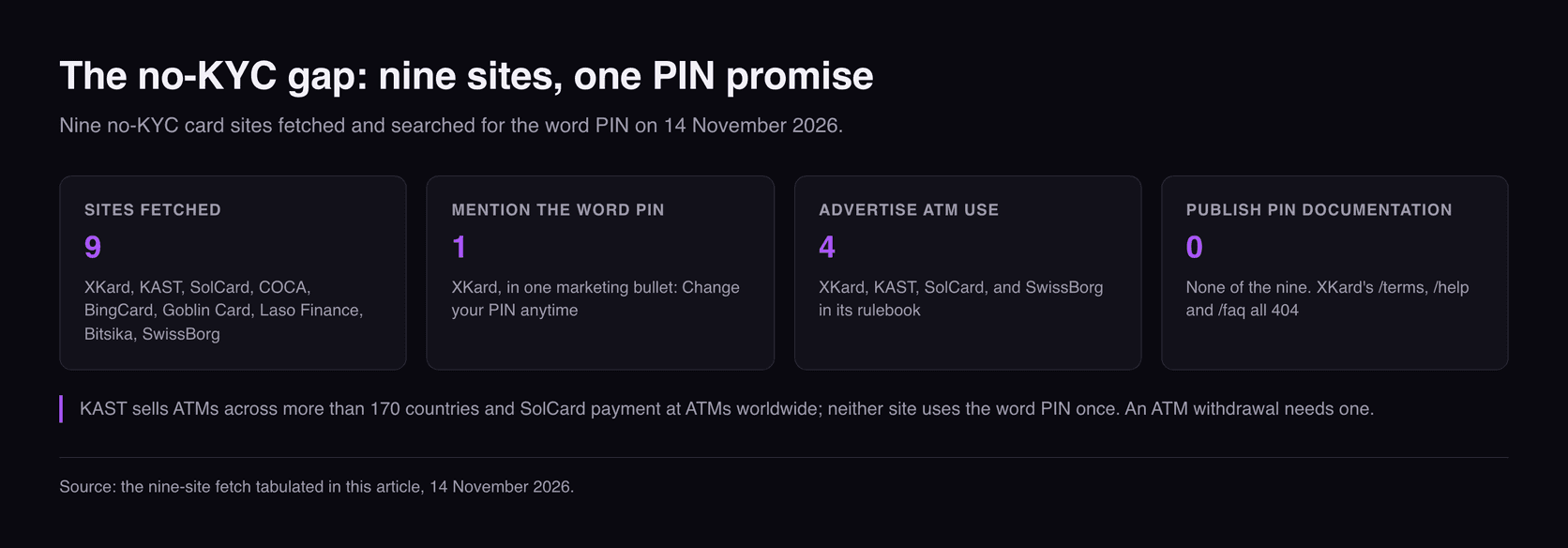
The programmes above publish something. The cards this site exists to compare mostly do not, so we checked rather than assumed: nine no-KYC sites fetched and searched for the word PIN on 14 November 2026.
| No-KYC programme | PIN mentioned? | ATM use advertised? | PIN documentation |
|---|---|---|---|
| XKard | Yes — one bullet | Yes — physical card, with limits | None; /terms, /help, /faq all 404 |
| KAST | No | Yes — “ATMs across more than 170 countries” | None |
| SolCard | No | Yes — “at ATMs worldwide” | None |
| COCA | No — zero in 1.29 MB | Not on the page we read | None |
| BingCard | No | Not on the page we read | None |
| Goblin Card | No | No | None |
| Laso Finance | No | No | None |
| Bitsika | No | No | None |
| SwissBorg | No — not in the rulebook | Yes, in the rulebook | None |
XKard is the only programme in the set that makes a PIN promise, and it is a marketing bullet rather than a help page: “Change your PIN anytime”, listed beside locking the card. Its physical card also carries published ATM limits — $1,500 per transaction and per day, 30 operations per day, $15,000 per month. What is missing is how: no help centre, no PIN article, and the terms, help and FAQ paths all 404. On every question this article answers, the record is silent. We disclose a commission relationship with XKard, which is a reason to be more careful, not less. Gnosis Pay is a different kind of blank: its help centre now calls itself a legacy site and its two indexed PIN articles both 404, consistent with the wind-down of its card.
KAST and SolCard are the sharper version. Both sell cash access — KAST's card works “at ATMs across more than 170 countries”, SolCard offers payment “online, in-store, or at ATMs worldwide” — and neither site uses the word PIN once. An ATM withdrawal needs one, and Modulr says every ATM checks the online PIN. The feature is advertised; the thing that operates it goes unmentioned.
This is absence of evidence rather than evidence of absence: a programme can have a working PIN flow and no page describing it. But the published programmes reveal a second cost — every one gates PIN viewing behind contact details, whether Wirex's passcode to a registered mobile, SpectroCoin's code to the linked phone or Crypto.com's identity check. Looking up your own four digits means the programme holds a phone number for you: the same bargain as 3D Secure on crypto cards, and the same data described in what crypto cards keep about you.
What to do when your PIN stops working
Almost everything above collapses into a short sequence, and the order matters more than any step in it.
- Look the PIN up before you try again. Most programmes with a physical card will show it to you, and Bit2Me's instinct is right: if you are unsure, do not enter it randomly.
- If you changed it recently, the old PIN is probably still live on the chip. Use it once at a terminal that goes online, or better, at an ATM — then request a balance, as Wirex advises.
- Stop at two wrong attempts. Three consecutive failures blocks it on every platform here, and on Stripe that deactivates the card for every kind of payment.
- Work out which PIN blocked, from what still works. If online shopping still goes through it is the chip; an ATM “PIN Unblock” or one online chip-and-PIN clears it. If nothing works, the online PIN went, and only the programme can reactivate the card.
- If your programme publishes nothing, ask support two questions now. Can I change the PIN myself, and does this card use an offline PIN? Our round-up of who issues each crypto card is the fastest way to guess the platform underneath.
Final take
The honest answer to “why was my PIN refused” is that your card has two of them and your app reaches one. It is how every EMV chip works, and the platforms underneath these cards document it clearly. What almost no consumer-facing programme does is pass it on — which is why the fix reads like superstition rather than engineering.
See which cards document the basics
Kardd reads what each card actually publishes — issuer, KYC level, fees, limits and the clauses behind them — so you can tell a programme that documents a PIN, a block and a recovery path from one that documents none of them.
Kardd may earn a commission on sign-ups, including XKard, whose only published PIN statement is the marketing bullet quoted above. Affiliate disclosure.
Sources
All read on 14 November 2026. Modulr, “PIN Management” (both definitions, the un-retrievable offline value, the chip unchanged until an online chip-and-PIN transaction, the ATM guarantee, independent blocking). Stripe, “PIN management” (three consecutive failures, the inactive status, the old-PIN transaction rule, the country table). Lithic, “Managing Online PIN Cards” (pin_status and EXCESSIVE_PIN_ATTEMPTS). Adyen, “Manage card data”. Crypto.com US Prepaid Visa cardholder agreement (the PIN section, identity verification before issuance, no virtual-card PIN), plus its regional help articles for the US, EU and UK, Canada, Australia and New Zealand, Bahrain and the GCC. Wirex, “How to view/change your Wirex card PIN” (the OTP, the Mastercard ATM-only route, the balance enquiry). Bit2Me on a blocked card PIN. SpectroCoin on card credentials and PINs. Gnosis, “ATM withdrawal with a Gnosis Card”. SwissBorg Card Rulebook (read in full; no PIN clause of any kind).
Recorded rather than guessed. The nine no-KYC figures above are our own fetches of each live site on 14 November 2026, searched for the word PIN: xkard.io, kast.xyz, solcard.cc, coca.xyz, bingcard.com, goblincard.com, laso.finance and bitsika.com all returned 200, while getcocacard.com would not connect and three XKard paths 404. Quoted nowhere above, because we could not read them: help.gnosispay.com and help.cryptopay.me both 404 on their PIN articles, Adyen's online-versus-offline explainer now redirects without that content, and Coinbase's cardholder agreement PDF returned 403.
Related Articles
- Crypto Card Declined? 9 Reasons and Fixes for 2026
- Crypto Card 3D Secure 2026: Five of Six Need a Phone
- Crypto Card ATM Withdrawal Fees 2026: 9 Cards Compared
- Crypto Card Lost or Stolen 2026
- Crypto Card Sharing 2026
- Crypto Card Issuers 2026: 16 Programmes Checked
Frequently Asked Questions
Why does my crypto card PIN work in some shops and not others?
Because a physical card carries two PINs and you probably only changed one. Modulr states that the offline PIN is “stored on the card chip”, while the online PIN “is not stored on the card”. After an app change the chip keeps the old value until the card goes online — so a shop checking the chip rejects the new PIN while an ATM accepts it.
How many times can you get a crypto card PIN wrong?
Three consecutive attempts — Stripe, Lithic, Modulr and Bit2Me all state three. What matters is that the two block separately: Modulr says “Both PINs can be blocked independently”, and that “there is no way for you to know whether the Offline PIN is currently blocked”.
Can you change the PIN on a crypto card?
It depends on the programme and sometimes the region. Crypto.com allows an in-app Reset PIN in four markets but tells EU and UK cardholders to find “an ATM with Change PIN functionality”. Wirex allows it in-app only for Visa in APAC, and says an ATM is “the sole method available” for a Mastercard. SpectroCoin states that changing a PIN “is not possible”.
How do you unblock a blocked crypto card PIN?
It depends which blocked. For the offline one, Modulr describes a “PIN Unblock” option at an ATM using the correct online PIN, or an online chip-and-PIN transaction; Stripe says changing the PIN “even to the same value as before” unblocks it. A blocked online PIN is not a cardholder fix: the status goes to inactive and only the programme can reactivate it.
Can you see your crypto card PIN in the app?
On several programmes yes, and it always costs an identity check. Wirex sends a passcode to the registered mobile and shows the PIN for 15 seconds; SpectroCoin sends a code to the linked phone; Crypto.com requires identity verification. Seeing your own PIN means the programme holds a phone number.
Do virtual crypto cards have a PIN?
Usually not, which is why they do not work at cash machines. Crypto.com's US agreement states that “You will not receive a PIN for your Virtual Card”, and Gnosis says ATM withdrawals “are currently not possible with the virtual Gnosis Card, as it does not support a PIN code”. It is a programme decision, not a technical limit: Stripe sets a random PIN on both card types.
Do no-KYC crypto cards let you change the PIN?
Almost none say. We fetched nine no-KYC card sites on 14 November 2026 and searched each for the word PIN. XKard alone mentions it, in a bullet reading “Change your PIN anytime”, with no mechanism and no terms page we could reach. KAST and SolCard advertise ATM withdrawals without using the word once.